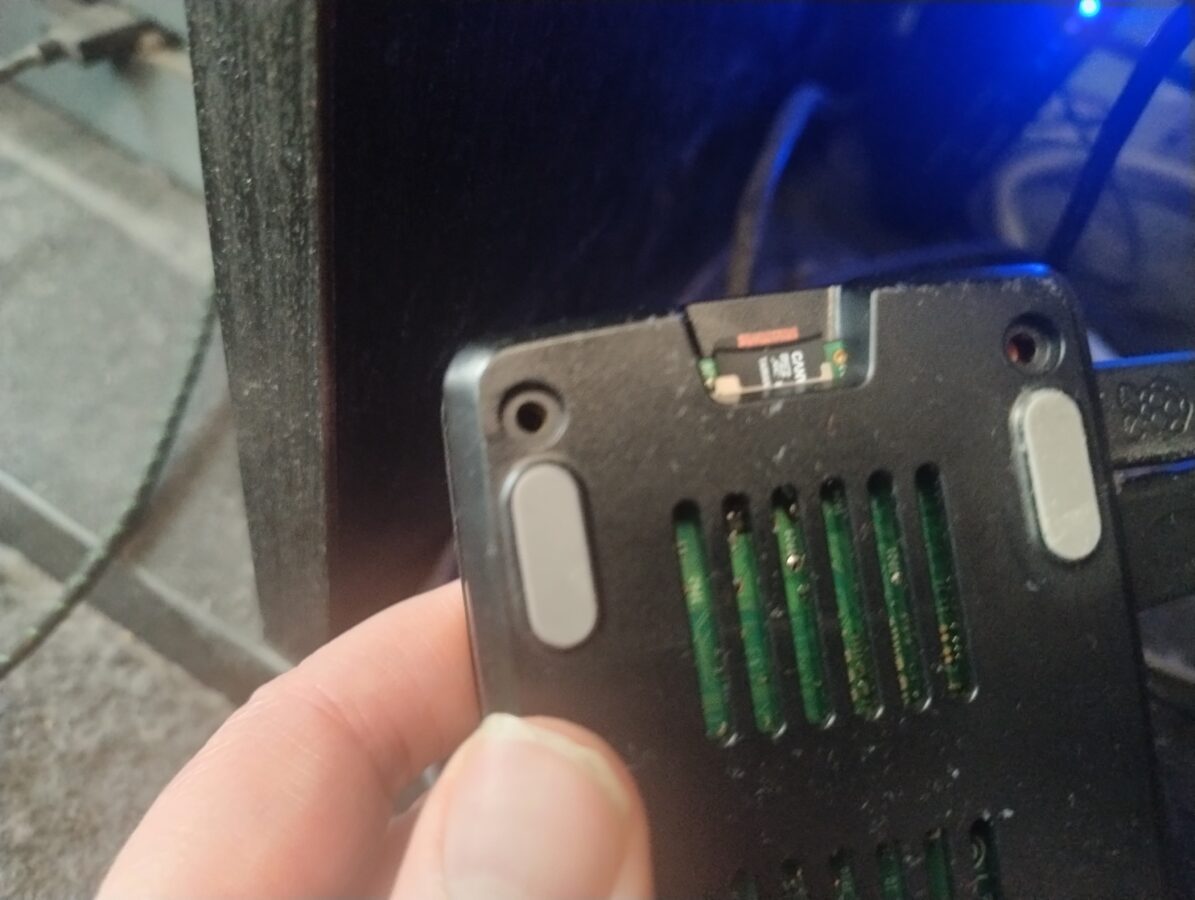
Some Problems With Corrupted Memory Card

I have had some problems with my Raspberry Pi 5 and its memory card. I have Recalbox installed on my Raspberry Pi. The problems started when I turned the power off from the button that this Raspberry Pi 5 has while it was running a game. This corrupted my memory card. Luckily it was quite easy to fix this problem once I got to understand what should I do to fix this matter.

So, the problem was that Raspberry Pi 5 wasn’t starting. The screen wasn’t detected and my television didn’t display anything. I had to search for some guidance which is nowadays easy. You just have to use a search engine that also preferably has a mode in which you can utilize some AI power. I first thought that I would try to run some commands directly from SSH connection. I tried to run this Linux command (“fsck”) but I couldn’t get it to work. I would have needed to unmount the memory card first and then I would’ve had to run that command.

I didn’t feel so confident trying to unmount the memory card. Luckily the filesystem that Recalbox uses is compatible with Windows. I found out that it would be possible to run a Windows command (“chkdsk”). The filesystem of a boot partition in my memory card was FAT32 and the other partition had a exFAT filesystem. I first only repaired the FAT32 partition. I obviously had removed the memory card and inserted it in my Windows PC. Now I inserted the card back to my Raspberry Pi. Of course it didn’t load. However there was a picture.

What I had to do was to also repair the larger partition of this memory card that had the exFAT filesystem. So, after I had repaired both of these partitions, the Recalbox system now started just as it did before the memory card became corrupted. So, the problem was eventually fixed.

The memory card of a Raspberry Pi is quite vulnerable and it can get corrupted easily if you switch the power off in a wrong way. You can also access your Recalbox system by opening a web browser on a computer that is connected to your apartments nertwork and going to address: “recalbox.local”. This enables you to for example restart and shut down your Recalbox system.

I recommend to use for storing your roms and bios files some other way than just a memory card. I have a 512GB USB stick that stores currenlty all my data that is used in Recalbox. This is just huge enough for some older game roms like PS1, Mega Drive and NES just to give you an idea. I have another device that I run some newer retro games, like GameCube and original Xbox, that has a bit more power and also more storage space. A Raspberry Pi 5 isn’t so powerful that you could run for example Xbox games on it. My other device doesn’t however run Xbox 360 or PS3 games. This would require a bit more power.

So, my usage of Raspberry Pi 5 continues. I have been waiting some more news also about Valve’s Steam Machine. It would be a considerable part of my setup in the future. It would provide some power for playing retro games with emulation. We just have to wait for the announcement of price and release date. I am also dreaming about purchasing a PS5 console to empower my gaming setup even more.

The problem has now been fixed. Recalbox for Raspberry Pi 5 uses these two types of filesystems that are very much compatible also with Windows along with the compatiblity with Linux systems. It was eventually easy to fix this issue. Everything now works with this device as it did already some time ago.

The Power of Batocera

This blog post mostly deals with what Batocera can accomplish as an operating system for a PC. I recently bought a new personal computer. There were many reasons for this and one of them was the global transition to Windows 11. After October 14th (2025) Windows 10 wont be supported anymore by Microsoft. This means that there are no guarantees that your Windows 10 computer would be functional. There will be no security updates. So, I had to buy a new PC mainly because of these considerations.

My older PC was bought at the end of 2020. It wasn’t an old computer. It just wouldn’t be supported by Microsoft anymore after October 14th. I have to agree that it had some age already, but I really wasn’t ready to buy a new computer. I would have liked to use the old one a bit longer than was actually possible. My new PC runs the latest PC games smoothly. It also runs Xbox 360 and PS3 emulation which wasn’t possible with my older PC.

I figured that since my old PC was powerful enough to run PS2, GameCube and original Xbox emulation, I wanted to use it as a retro gaming platform. I have had some nice experiences with Recalbox, so, that was my first option. Well, I wasn’t at first able to get Recalbox installed directly to my older PC. It did run but it was kind of installed to my USB stick. I wanted to try to install Batocera instead. I had heard a lot of positive debate about it. So, I went with Batocera and finally it worked like a dream.

Batocera is an operating system that is very much related to Linux and is also dedicated to being able to run some retro games. My older PC was powerful enough for this purpose. After some fiddling with installations and moving some games to the computer I managed to get some games running. I think original Xbox, GameCube and PS2 have many interesting games for me to play and experiment with. Since all my gaming consoles of this particular era have ended up getting finally broken I figured that emulation could enable me to play these kinds of video games one more time.

I have this issue with older gaming hardware. I have a Nintendo GameCube, Sony Playstation 2 and also an original Xbox but they all broke down as I had them set up in my corner of gaming in my living room. I guess they are gathering too much dust and finally end up not reading the disc at all. I also have a Xbox 360 console that isn’t functional and the reason seems to be dust.

You can actually run Batocera from a USB stick but I wanted to install it to my older PCs hard drive. This required me to boot the computer to my USB stick. This required some fiddling with BIOS settings. This isn’t actually difficult but it requires some knowledge. However there are instructions that can be found online. I also wanted to wipe my disks completely. I did it with a program called ShredOS. Now, this procedure took about 14 hours. I ended up running it through overnight so I wouldn’t need to monitor this. After I got rid of all the content from my hard disks, that were a 2TB disk and a 256GB disk, both of them SSDs, the actual installation process was simple. Of course I had to set up all of these systems BIOSes and move over all the game roms.

I wanted to be able to play my retro games on the Batocera that I had installed with a controller of Xbox Series S/X. I find this controller to be as comfortable as a controller can be. I also bought a good quality cable that was three meters long. This way the controller didn’t need a battery at all. I don’t actually mind about the cable. I actually prefer using cable over using a battery in a controller. The latest Xbox’s controller is also a natural choice because it is very much compatible with a PC. I am playing my GameCube, original Xbox and PS2 games with this controller. It is very versatile as a game pad.

Batocera needs some power to run this kind of emulation. It is nice to be able to actually have a dedicated device for playing retro games like this. I am very content that the system is able to run also Dreamcast games if I would just set up the BIOS and move over the game roms. You can also play some older video game consoles games with Batocera. Some of these games feel a bit clunky since they are a bit old already. All in all I find Batocera a good video gaming operating system for any gamer. It is a good way to utilize also your old personal computer if you are replacing your old PC maybe because of the transition to Windows 11.

Is Sega Saturn Worth Your Time?

The story of Sega Saturn is, might I say, interesting. It was released in 1994 in Japan and in 1995 in Europe and North America. So, it was a competitor of the first PlayStation gaming console. To begin with Sony made its consoles price a bit lower. It had an edge because Saturn had already been released when the talks began about PlayStation and its pricing. If we look at sales numbers we can see that Sony sold a bit over 100 million PlayStations worldwide while Saturn sold somewhere around 15 million units also worldwide.

Why would you bother to take some time to get to know to a loser like this? Things aren’t always as clear as they might seem. There are some reasons why Saturn sold so badly. After all the sales figures can only tell so little about the variety of games, even some exclusives, that you just couldn’t experience elsewhere. Today Saturn is being recognized as an important part of history of video games. It sadly lost to its competitor or competitors as it couldn’t adapt as quickly to video games moving on to three-dimensional graphics. This was somewhat a start of an ending for Sega’s game console efforts. This wasn’t however its last misfortune but that’s another topic for another blog post.

How can you play Sega Saturn today? The legit way is to buy the hardware needed. You are then going to buy a Sega Saturn. It might cost around 200 euros. Maybe a bit less if you don’t buy it from a game shop. Maybe a bit more if the condition of the device is very good. You are going to also need some actual and physical games to play. Saturn games are somewhat rare to find. We haven’t seen and I doubt that we will ever see some sort of a mini console made out of Saturn. This might be a bit sad.

While always taking account on what is legal and what is not. Let me remind you that if you are going to play Saturn games on an emulator you would have to dumb your consoles BIOS to a file. Also you would have to rip every game from a Saturn type of a game disc that you actually own. Otherwise in terms we are going to an illegal zone.

If you consider game preservation it is definitely nice to have these places online like “Vimm’s Lair” (check from your DuckDuckGo search engine if you wish) that provide you with every single Saturn game ever released. If there aren’t any places that you can buy your Saturn games how are you going to manage to acquire a collection of Saturn games and maintain also a working Saturn console? Now that’s a question. What might the current copyright holders think about that? I think that if you don’t release remakes, or even even collections, of these classic titles the option seem to be very clear.

If you go for the emulation option it is nice to have a Rapberry Pi 5 with 8 GB of RAM and install a Recalbox operating system to it. After that you are going to have to move your game roms and BIOS file to a proper location. You can then enjoy the game play using Xbox Series controller or some other USB connectable controller. I myself prefer the Xbox Series controller. If you choose you can also install, like Mednafen, on your Windows PC. The games run very well also there but it might be clumsy if you want your screen to be presented through a true television instead of your PCs screen.

After discussing about some philosophy about old retro-type games we can now finally present you which games to choose to play. The first one that I can recommend is Radiant Silvergun. It is a smooth space shooter where you control a space ship and move from bottom to up shooting these enemies that appear on the screen. A true space shooter is this game. This game was also recently remade for Nintendo Switch. So, you might want to check it out also.

Next game I am going to introduce to you has been also remade recently. The game is House of the Dead. This is something that you would probably play preferably with a optical gun but you can also play it with a controller. The game is very nice. You just shoot things that appear to the screen. You also need to reload your weapon almost constantly and try to not to shoot friendlies.

Two other games I like mention here are Panzer Dragoon and Nights Into Dreams. These are very good games. Panzer Dragoon is currently available for Switch. I don’t know why so many of these remakes appear for Switch. While making a list of best games on Saturn you cannot forget Virtua Fighter and Virtua Racing which come directly from Sega. You probably can dig on and on and find more games that you like. If you need more games try Sonic games and Sega Rally.