How Many Buttons Can You Handle?

First of all I am sorry for not posting anything for a while. I haven’t had time, effort and, or, motivation to write here. So it’s been three weeks since I last posted here. But, now it’s time for me to write something for you guys. As you may have noticed I have added some advertisements to this blog. Maybe I get something out of this. I don’t know and we’ll figure out as I keep writing these stories here. I am trying to write something at least once in two weeks or so.

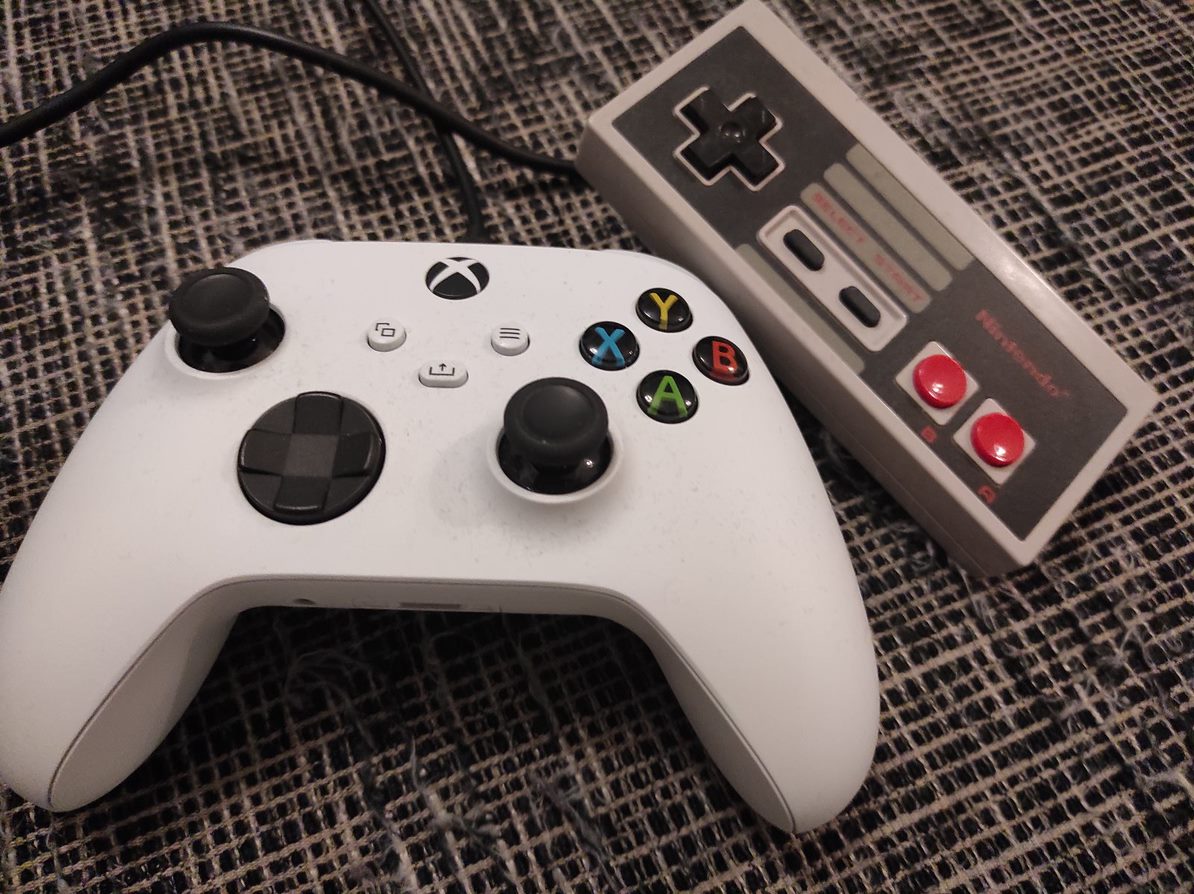
So, I decided to make a bit of a comparison between game controllers. In that featured image we have a NES controller. Now that’s about as old of a game pad as can be. Or do you remember something more older or simpler? Now, it has only buttons A and B, select, start and the directional control. There are older controllers but basically it doesn’t come much simpler than this. And look at the shape of that thing. It’s actually a piece of block with all those sharp edges.

To make this comparison as concrete as can be I chose the other game pad to be the standard Xbox Series S/X controller that I got shipped with my Xbox Series S. This controller has Y, A, X and B buttons, two thumb sticks, a button to control directions, four shoulder buttons and four more buttons. As you can notice I have acquired a cable for my controller so I don’t need to keep changing batteries all the time. This game pad is also very neat, good looking and fits in the players hand smoothly.

It is definitely simpler to play NES games. While playing Xbox Series S or X games you have lots of going on. Your ways to interact in the game is more diverse. As you might have or might have not heard there is actually a limit for things that a human being can handle at a time. That’s why all the menus in the user interface usually have limited amount of choices that the user has to make. This isn’t directly what is happening here but this gives us a view to what’s really going on as you are playing a game.

Remember those annoying selections you have to make when you make a phone call. You are given maybe three or four choices and you have to press a number corresponding to the selection. The user is unable to see the options that he or she has. So that’s an example of bad user interface design. I know this isn’t exactly what is going on but this is just an example of these psychological rules that our brains use to work.

So we have a more advanced controller here. As you can see the shape has been developed to be more friendly for the user. You have more options but also more responsibility. You have the ability to move accurately the cursor. So the thumb stick can actually replace the control of computers mouse. There has been almost thirty years and you can clearly see that things have in this matter progressed. I probably have to say that this controller is also if used so completely wireless.

One important thing I have to mention while we’re on this subject. It is important that the user can get out of the game and exit from it and maybe even pause the game for a while. Both of these controllers have this option. While using NES you can hit the right button to pause the game. When using Xbox Series S you have the option to pause and exit the game mode and kind of return to the operating system mode. You can also think about how this works with virtual reality. You definitely need a way to pause the game at any time you have to.

Waiting for Diablo II Resurrected

In the middle of all retro games I have had a chance to play I have also been waiting eagerly for the next purchase I have planned for my shiny and new Xbox Series S. And it is going to be after all Diablo II – Resurrected. How have I prepared for what there is to come? Of course I got my copy of Diablo III and installed it again to my newest personal computer. It’s been a while since I played this one the last time. It was actually released back in 2012.

Do you remember Diablo III? This game got the whole internet stuck world wide. It is required as you install the game for you to connect to the server for a moment. This is actually true. I am not telling lies here. There were actually so much weight on the whole internet that it made it a bit slow for us for a moment. Although after a while things were normal again. This happened at the moment when game was released and this didn’t repeat.

After I installed the game I noticed that I would also need to login to my Battle.net account. It still held my hero that I had previously played as. I am aware that it is a bit different to play this game with a controller but not so much different after all. I decided to start a new game and this time I chose to be a Wizard.

I played for some hours and got my player to level up to all most to level 20. After that I increased the difficulty level up from normal to first hard and then to expert. I found out that I am not so good at playing this game as I could be. I do enjoy casting different spells and trying to kill as many monsters as I can to gain more experience points. This game is still lots of fun. I have also bought the t-shirt when it still was available from one Finnish webshop. And I remember travelling to another city to get it. That was probably back in 2013 or so.

Why not introduce the game a bit for those of you that haven’t heard or played it? Diablo III is probably where you want to start if you want to get into some playing modern Diablo games. I don’t exactly know how Diablo II Resurrected will be. I haven’t yet played it. But here we will start from the third game of this series. So Diablo is an action role playing game. There is lots of things going on. The main activity is to kill monsters. Your health goes down when monsters hit you. Sometimes they hit you with some magic. There is different kinds of magic spells that you can use and also that your enemies in this fictive world can use. In earlier Diablo games you had quite strictly mana that you could use for your spells. This is a bit comlplivated in the third game. But you can for now think this power to be almost like mana. So you spend it on spells and it keeps coming back when time progresses (or you have to drink a mana potion or something like that).

There are different kinds of weapons and armor that keep your character to not to take so much damage. Better weapons give you better damage against monsters and other enemies. You can use a teleport to get back to the village. There you can heal yourself to your current maximum health and repair your weapons and armor. A big part of this game is searching through different maps and doing some kinds of tasks. There is a plot but it isn’t the main reason for someone to play this game a lot. There is a lot of fantasy involved. This is a role playing game after all. It takes it’s roots and it is considered to be (or so I heard a speaker at one years “Games Now!” lectures to say) three out of five (3/5) of a “roguelike”. Roguelike is just a term that is used of a game that reminds of an ancient role playing game that was actually named “Rogue”. Maybe that’s enough about these Games Now lectures and it might be a story for another post, maybe, some day.

If you like Blizzards games such as Warcraft and Starcraft which are real time strategy games you will definitely like Diablo games also. They rely a bit more on the combination of fantasy and action mixed with these role playing features. And when I am mentioning Blizzard I have to mention World of Warcraft. It is actually very dependent on online players as it is an online game. I am not after all such an expert nor have I even played it.

Anyways, let’s hope this new Diablo game would be a good one. It will be released next week. The actual release date is 23rd September. So I will get my hands on it the next Thursday. The graphics must be something to see. We are still waiting, of course, also for Diablo 4. And please don’t mind me posting this screenshot. It isn’t the sharpest of all the Diablo screenshots possible but it is a good one from a game nine years old.

Something New in PlayStation 1 Emulators – DuckStation

I keep my eye on YouTube. I watch videos there. Gaming is one of the topics that I am most interested in. It doesn’t come as a surprise that there are countless videos about Xbox Series S. I found a very interesting information from one specific video that introduced a way to play PlayStation 1 games on your new Xbox.

This is possible through a new retro game emulator called DuckStation. I am not going to go to all the details of how playing PSX games this way is actually possible. After all it is possible. You have to enter to Xbox Series S in a “developer” mode. Then you will have to install DuckStation and tweak the settings. Of course you need also the BIOS and roms of all the games you are going to play.

DuckStation is a very powerful emulator application. You can enhance your graphics a lot and it is promised that you can play old PS1 games with a 4K resolution. Why would you want to use your new Xbox for this? Maybe it is because it has a limited hard disk space or maybe you just haven’t found the most interesting games for this new console. What ever the reason for you to be interested in DuckStation is it can provide you an experience on retro gaming once again with all your classic PS1 games. DuckStation is also available for Android and Linux and Windows.

I am not so interested in this way of using my new console for retro gaming. I prefer to play my emulated PS1 games on a PC. There are many reasons. One is that you can choose to use Dual Shock 4 controller through DS4Windows. I prefer to use my controller this way instead of using the new Xbox game pad. Playing PS1 games with Xbox’s controller? That’s definitely a no from me. When considering it this would be a good way to expand your collection of games a bit. Maybe you can play Xbox with a different controller somehow?

You can find more information about DuckStation from the link below:

https://emulation.gametechwiki.com/index.php/DuckStation