Doom 64

Today was a day off since it’s Saturday. So in the morning I picked my Xbox Series S controller and figured that I would play a bit Doom 64. I have purchased this some time ago. I have played it and also advanced a bit. I am currently in level 21 out of 28 levels.

If you are interested in classic Doom this might be the best Doom version for you. It has this certain retro feel to it. So Doom 64 was first released for Nintendo 64 and that’s where the name comes from. This game has currently a price of 5 euros. So I encourage you to try this game. There really aren’t any ifs in this matter. I can recommend this for every type of a gamer.

The original Doom was released back in 1993 by Id Software. The graphics were mind blowing for its time. Playing the game can first seem a bit confined but you get the hang of things quickly. There are several different weapons in Doom. My favorite is shotgun but you can also shoot enemies with a rocket launcher, machine gun or plasma gun. You really cannot aim vertically and you can not jump. You can however in Doom 64 set running to automatic.

Shooting enemies is only one aspect of Doom 64. You have to solve some puzzles in somewhat complex levels. Sometimes you have to find a key card to open a door. In the end of the level you get some statistics about how many enemies you eliminated, how long it took to get through the level and how many secrets you found. The level of difficulty can be adjusted considerably.

I really like the Android app that Xbox provides. This featured screenshot was very easy to take and it was also easy to add it from to this blog post. So Microsoft has made things easy for me. Currently I have spent a bit over 9 hours playing this game.

There really isn’t so much in this topic. This is a great game. I think the quality-price ratio is very correct here. You also don’t have to take this game so seriously. I recommend if you think you are going to get this game to relax and explore it thoroughly. There are many thing different here compared to modern games which at times seem maybe a bit boring. This game was released in the days when we could witness a great progression in games we were playing. The era of 3D modeled games was only beginning back then.
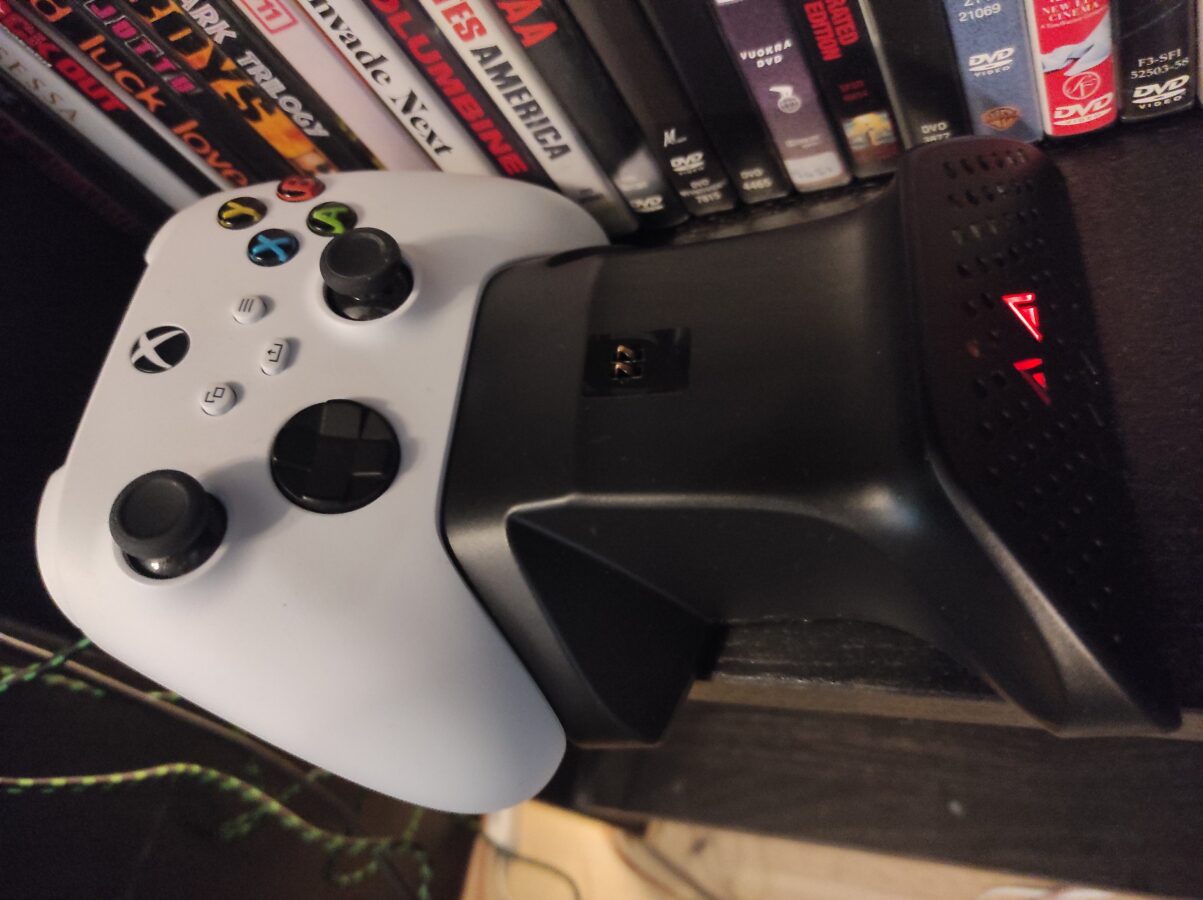
Twin Docking Station

I made a great purchase. Or so it seems right now. I bought a charging station for my Xbox Series S controller. I ordered also another gamepad and it will be delivered later.

So this is Kyzars Twin Docking Station. It came with two chargeable 850 mAh batteries. You must connect the docking station to Series S through a cable. Docking station charges controllers even when Xbox is powered off.

Batteries support both Xbox Series S or X and Xbox One. The package comes with a cover for both controllers and also for both types of controllers (Series S/X and One). I previously had a long three meter cable for my gamepad. I guess I am going to give wireless controllers another try.

I remember not being pleased with wireless controllers as I got my PS4 way back in 2014. The battery was drained out of charge quickly. Then I decided that I have to buy a long cable for every controller I am going to use. This way of thinking might now change.

Using single use AA batteries worked somewhat comfortable. Only disturbing matter was that you actually used these batteries for only one time and then just threw them away. That doesn’t sound good at all thinking about the environment and things like that. I hope that these new batteries that came with this docking station last for a pleasent amount of time. I will have to try and test this as I get more deeper into using this device.

I have to mention that the docking station was very cheap. It cost only 25 euros. If you think that a pack of ten AA batteries costs a bit over 5 euros this seems to be a good price. You will get also four lids that you have to change to your controller that enables charging of the controller.

I connected the charging station to the back of my Series S. It seems to be the best way to connect these devices. I didn’t throw away my three meter controller cable. I hope I don’t have to use it anymore. I will have to play around with these batteries and see if they really keep their charge. I hope they keep their charge for at least three hours. That would be enough to satisfy me.

My Xbox Series S

I decided to write about my dear Xbox Series S. I bought this gaming console last years summer. I originally placed it inside that Ikea shelf that has eight places for consoles. This shelf holds now seven of my game devices. So I actually moved my Series S to the right side of my television. And one place in this shelf has a basket in it where I store my controllers and also some cables.

Why did I move my Series S to its current position? I was thinking that it might not get enough air flowing through it. Although I haven’t heard of cases where a new Xbox console would have overheated. I thought about it for a while. As I placed my hand on the console I felt that it was extremely hot. So I thought I should place it better.

The console never gave me any error messages but I  noticed that it was cooling way better. I couldn’t feel almost any heating after I had placed the console better. I first thought I would place it on the floor but came to other thoughts a bit later. This was finally a good place for the console.

I have enjoyed my Xbox Series S greatly. I think the price was suitable. I hate that my Xbox doesn’t have so much disk space but I guess if you can play at least two or three games at a time and have them installed must be enough in these situations we are currenty still facing. I would have surely bought a Series X if they would have been available.

Some games I have for Series S are Call of Duty Vanguard, Diablo II Resurrected, Control and Mass Effect Legendary Edition. I have been content in having all of my games digital. I would like to play some of my Xbox 360 games with this new Xbox but as my Xbox 360 still works this isn’t so much of an issue. I love playing older or remade games also on my Series S. I really like the controller. It must be compatible with also a PC. I haven’t really tested. I do have  a USB to USB-C cable for the controller so I don’t have use batteries.

I think I got, once again, a nice picture for this blog post. That small device that is placed to the right of the Xbox Series S is my HDMI selector. It enables me to connect several HDMI devices to my television. I definitely had to buy this because I have so many consoles and my television had only three HDMI inputs. I also have room for up to three SCART connections in my television.

I might some day take some more pictures of my collection and setup that I have for gaming in my home. I do have lots of games and so little room. I just other day moved some of my games to storage. I still kept most of my games in this gaming corner that I have.