Thinking About Strategy in Colin McRae Rally 2.0

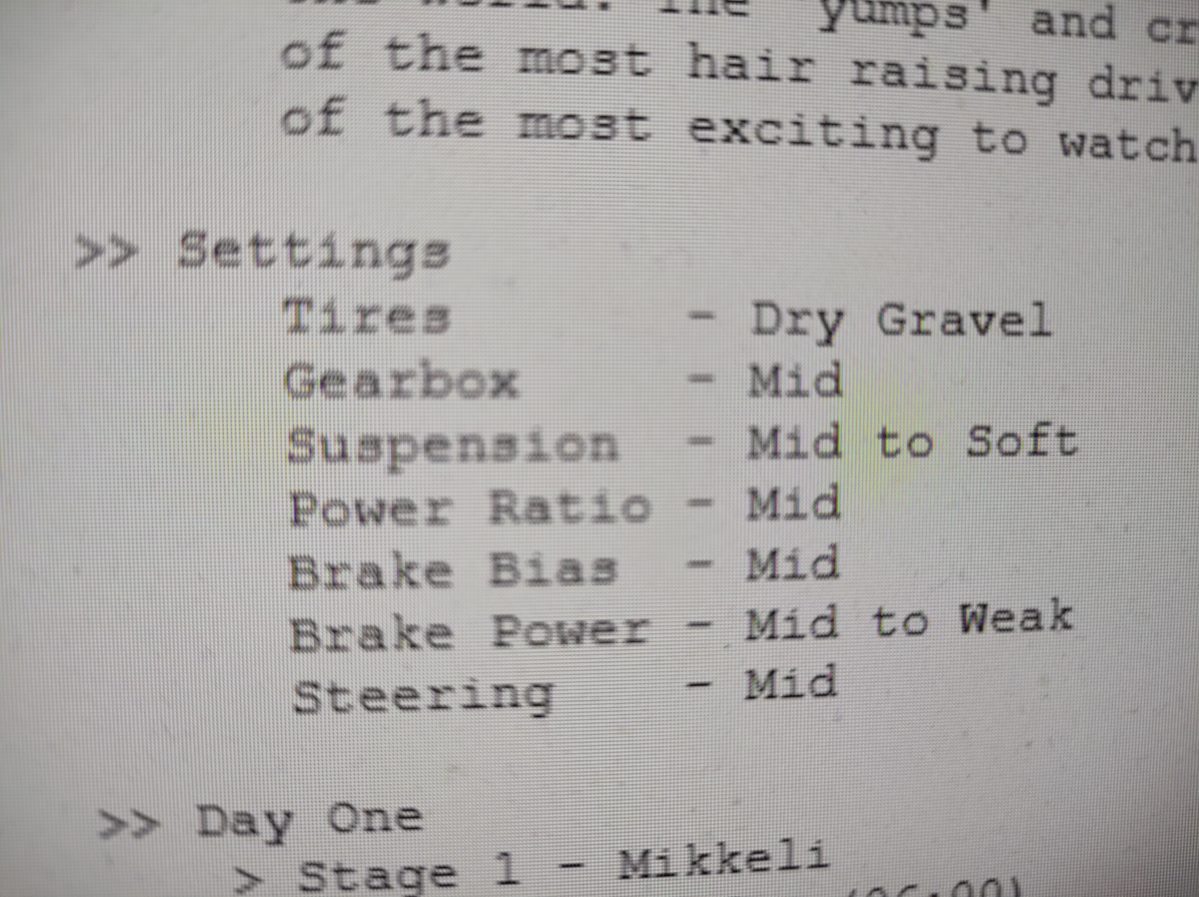
There are basically two ways to think about your car settings in Colin McRae Rally 2.0. You can concentrate on driving and copy the best settings from a strategy guide (which is actually available through internet for free) or you can actually test your car with different settings and change them to your own liking. Testing your car to find a good setting can take time. In this text I would like to describe how these settings take impact on your car in this game. I will tell you what each setting will do. So let’s get to it!

There are different settings in this game for tires. Basically you have slick tires that are good for stages that are mainly driven on tarmac. Spikes are good for ice. There are also settings for wet and dry mud and wet and dry gravel. So yo have to choose your tires based on how the surface of the road is. This is pretty simple. You just choose a right tires for each type of road surface.

There are however some settings that aren’t so clear on what they have effect on. Well, actually “gearbox” isn’t so complicated. You can set your acceleration to maximum level but then you loose some top speed. And you can also set your top speed to maximum and you will lose some acceleration. Good acceleration is nice for stages that have many corners and high top speed is better on stages that have long straight parts. That makes sense doesn’t it.

“Suspension” can be adjusted to soft setting on stages that are bumpy or that have many jumps. When driving on flat stages and also stages that have tarmac on their road it is recommended to adjust suspension to hard. You can also adjust your breaks and power of your car to have a tendency to under or over steer. And finally the last setting you have to worry about, that is called “Steering” tells you how sensitively you can steer your car. It can react fast or it can react a bit slower to how you turn your driving wheel (or press the buttons if you are playing this game with a game pad).

If you don’t like to fiddle with the settings and you want to just drive here’s a link to the strategy guide of Colin McRae Rally 2.0.

Pushing Hardware to its Limits (Commodore 64)

I decided to try playing Commodore 64. I somehow started to admire this product of computer industry. It started as I tried to figure out something new, again, something new that I yet haven’t discovered as a gamer or player. I was born in the 80s. But you would have to be a teenager back then if you picked a Commodore 64 up and really started fiddling with it.

There were just so many possibilities for a person. You could just play or you could learn BASIC and ultimately if you were good at it and had some sort of flow and interest in this technology you could go real far. You could actually learn how the thing works and program it to do whatever you wished to. This can be accomplished with Assembler programming.

My minor experiments are nothing compared to what some witty persons have accomplished. With this in mind I am going to begin. First I watched a video on YouTube that introduced me some games. It had 30 games on it. I picked the ones I found most interesting. Then I did a Google search and found this site . Just to give you a clear picture of what Commodore 64 is capable of doing I am giving you some names of some of the best games that I tested. The games are Amalyte, Bubble Bobble, Commando Arcade, International Karate, Katakis, Lode Runner, Prince of Persia, R-Type and Wasteland.

I have stumbled to Prince of Persia and Bubble Bobble way back when I was using our family’s PC so I already had a picture of what these games are like. They definitely didn’t look visually bad at all. You have to consider what kind of a device was in use. What were it’s capabilities of running games. I could just state here its specifications like processors speed and memory, ROM and RAM, that it had but that isn’t going to tell you much.

Commodore 64 was not so powerful. It is mind blowing how engineers and designers used everything they had to deliver games to consumers. There were many limitations to be taken in consideration. This made it a tough job for graphics designers, programmers and even hardware electronics professionals. They had to split the work depending on their own field of expertise. This is important also today when someone is trying to bring a product to the markets and available.

How did I feel after I tried to play some 1980s games? The limitations are there. As I was playing Commando Arcade I figured out some basic tactics and I find it to be real close to some modern shooting games. The action was fast. I had a modern game pad so it helped a bit. Bubble Bobble was nice. It is almost too familiar to me. And then there was R-Type which is a very nice space shooter. You can forgive the poor graphics because the playability is very good…and also fast.

If you are interested to find out more I suggest you use first your favorite search engine and find an emulator. I really didn’t have any hardware to test these games with. I am not sure if these games are available anymore and I think it’s okay to try them out. Later you can get familiar with hardware and you can actually also build your own C-64 if you have time and knowledge or maybe even both. I find even a small possibility of developing some or any software to Commodore 64 very interesting.

What Is Evercade?

Do you like handheld game consoles? Do you play retro games? If you answered yes to these questions you might find Evercade interesting. It has been in the markets already for some time. I haven’t really got into it but I think I am somewhat interested in it so I decided to gather some information and write a blog post about it. Here we go!

We have seen many forays on handheld retro game consoles. They are marketed by saying that they include tens or hundreds of classic games. I have also seen some do-it-yourself projects that have been made with Raspberry Pi. Evercade is a bit different. It offers games in a form of cartridge that has many games, like ten games or so (it actually varies a bit). So you can buy more games.

Let’s talk about some features. It is possible to connect Evercade to television with HDMI connection. Evercade scales th picture to HD resolution when connected to a television. It’s battery is charged through USB-to-micro-USB cable. There is a place for headphones and it is a mini-plug-connection. There is no Bluetooth connectivity. You can see in the “Featured image” of this post how the controls are positioned. Controls include also trigger buttons on left and right side of the device. The size of the screen is 4,3 inches. It is promised that Evercades battery will last four hours maximally. And one more thing about the features. The price of the Premium Pack is, here where I live, about 110 euros. On the Wikipedia it is said that the price is about “£80/$100”.

I think this product is interesting. I don’t know if I am going to buy it. I have made lately a purcase that I will now only tell that about it that it was a handheld game console. So I am not so interested in buying another new console. Also I am not going to buy any new game consoles to be connected to our television. My living room has right now so many consoles that I would have to think about where to put them and how to accurately display them. So I’m basically running out of room.