Gaming with Raspberry Pi

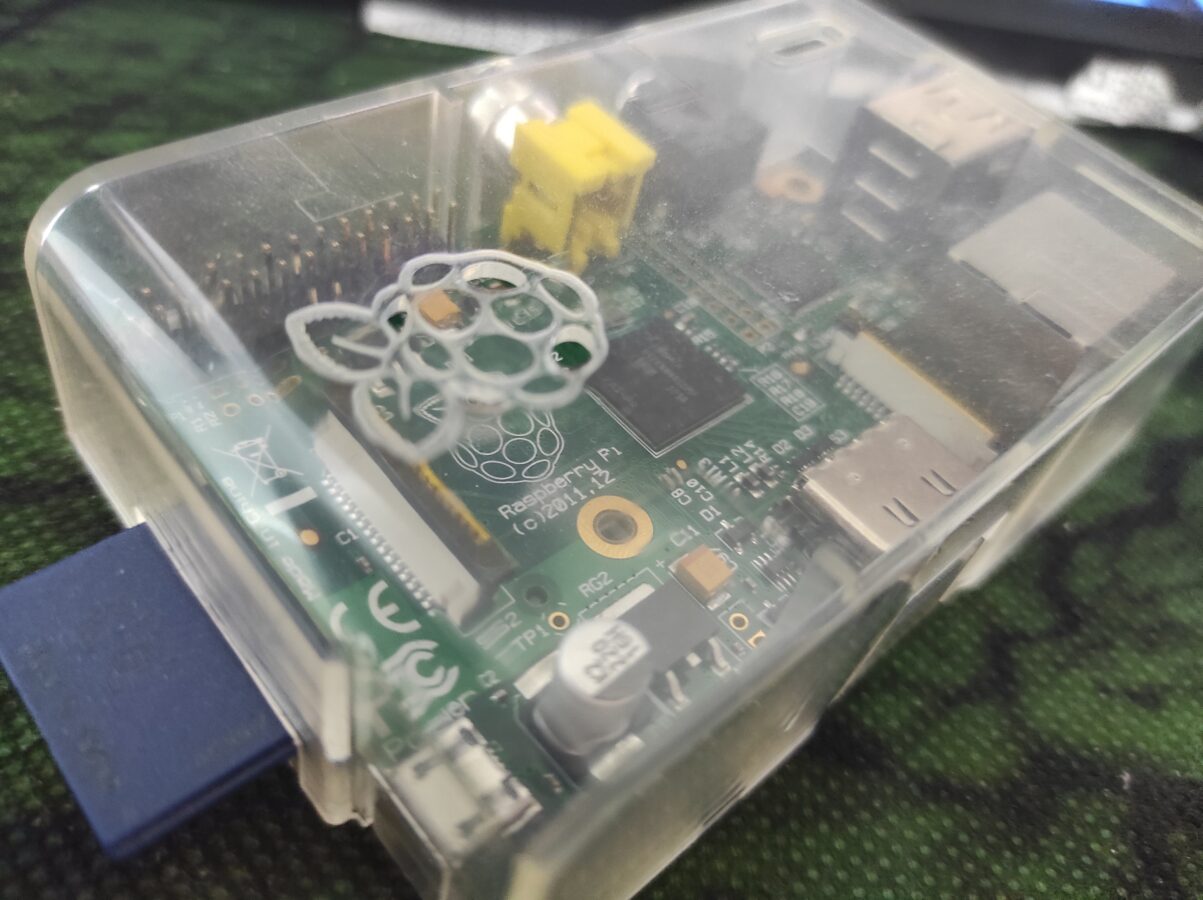
So I have this old Raspberry Pi 1 that I got back in about 2011. While it has many uses I haven’t utilized it in a while. What makes this interesting for the readers of this blog is that it can be used for retro gaming. While it is not able to run decently games that have 3D graphics it is perfectly good for playing retro video games like SNES games to give an example. Newer Raspberry Pis are capable of running some more advanced games that have 3D graphics. It is also not a bad choice to pick up a NVIDIA Shield if you are interested in emulated retro gaming and you want to be able to run games with 3D graphics. Shield can even run some Sega Dreamcast with Sony PlayStation games. If you want to be able to run PS2 games I think this is not, at least yet, your way to go.

So we have this Raspberry Pi 1. It has many ways that you can connect different equipment to it. It has two slots for USB. The connections are white which tells us that they are of type USB 2.0. This doesn’t affect us so much. The connections could be colored blue that only tells that they would be a bit more advanced and more effective in transmitting data through them. But for a USB controller or even Bluetooth dongle would work with USB 2.0s just fine. You can even expand these USB slots with an USB hub. It can provide you more USB slots.

If you don’t want to sacrifice one USB slot for Wi-Fi dongle you can connect your Raspberry Pi to your network and internet with an Ethernet connection. There’s no Wi-Fi built in the first Raspberry Pi but some newer models also have this feature included. So you might want to consider buying for example Raspberry Pi 4 instead of the first release. The first release also only supports SD memory card up to 32 GB. While this is just enough to support playing retro games, it might be too small for some uses. There is HDMI connection which delivers the sound and the picture from the computer to the display. There’s also a slot for video output and a small slot, actually a mini-plug connection, for audio output. Raspberry Pi also needs a power input that is provided with 5V micro USB connection. You can probably use your old smart phone’s cable for this, that is you have one available.

You get that Raspberry Pi needs a memory card  and a power cable to work. You will also need a keyboard, maybe even a mouse, a cable for Ethernet and an HDMI cable. That’s just for setting up. You have to install yourself a good operating system. For gaming I would go with RetroPie or Lakka OS.

Here’s some links:

https://retropie.org.uk/ and https://www.lakka.tv/

There are many ways that you can get the image file to your memory card. You can probably read some deeper instructions from those links that are above this text. It depends on your host operating system but I know that you are able to make the installation with Windows and Linux PCs.

After getting the software installed you need to fiddle around a bit with the settings. You can usually just connect your game pad and configure the controls. After that you only need to use the Raspberry Pi with your controller. You need to transfer the roms to your device also. This can be done in several ways. You can for example transfer them to USB stick or you can transfer them from your local network. I am not getting to this since this blog post is not actually a tutorial. I am only discussing about the possibilities and I am trying to give you a clear picture for what it is like to get your old, dusted, Raspberry Pi to work for you as a gaming device.

I really think that this is all about this subject. You can run your SNES, NES, Mega Drive/Genesis, Master System, DOS and Atari 2600 games like this (just to mention some of the most popular systems). I would recommend for your game pad Logitech’s or a USB SNES pad although there are plenty of possibilities. Some controllers might not work so don’t try to plug your PS4 controller in as it won’t probably work and would need some fiddling.

Do you necessarily need Windows to play PC games?

Linux as an operating system of personal computers has been competing to this day against Microsoft’s Windows. Linux has advantages. First of all it’s free and mostly open source. So anyone with a decent knowledge about programming and computers and operating systems has an opportunity to learn and even modify this system. But is Linux capable of running the latest games? To this question I am trying to answer in this blog post.

Windows has a large support as an operating system that delivers reliability. It can run latest PC games and it is an answer to many electronic music producers as Linux currently doesn’t fully support VST instruments or many sequencer applications like, for example, FL Studio. Linux has some free music production apps. like Ardour, but to get your software and hardware to run decently is to my own experience a bit difficult.

Windows is not free. Windows still supports many hardware drivers that are important when running newest PC games. Take graphics processing units for example. Most of the GPU´s are supported. You have to pay for Windows. Usually you get the new Windows with a computer that you purchase. Usually you also get the update to a newer version when it is released. Still sometimes you might have an old computer and you don’t want to spend about 150 euros for only getting the newest operating system. Then Linux definitely is a good choice.

There is a war going on between Linux and Windows. It has been this way for decades. While Linux is supported by heavy users, technology nerds and programmers Windows is still holding on to it’s position as the default personal computer operating system. Of course there are also Mac users. So this also messes up the picture a bit. I definitely like to use Linux for programming if I can make a free choice. This is because it is more secure and it doesn’t need necessarily a virus protection application. It also has more opportunities to get deeper into technology of computer. You get to work with command line and the apps are mainly free and open source. You also get more updates and get to tweak your system a bit more.

You can get Windows games working with Linux. Older games certainly can be run through DOSBox, if they are DOS games, and through Wine, if they are Windows games. There has been a discussion goin on how clearly are Steam games running on Linux. There seems to be a certain distinction between Windows and Linux games that I am not so clear about. The software seems to be in question. I cannot reply to this question fully and I admit that. But it is an interesting point.

So if you plan to play the newest games my answer to you is – get a computer that runs Windows. That is to make sure that you have the latest drivers and have yourself the full support from hardware manufacturers and game developers. Since we are moving more and more towards digital markets when purchasing games it is also important that you have Steam or GOG.com or some other place to buy yourself games for your PC. This is how the situation seems to be. Linux has it’s own supporters and you have to keep in mind that Linux has it’s native games that run only on Linux. So to conclude – Linux is developing and it might be possible that it makes a takeover in the future but currently you will have to use Windows.

Learning Some Java

Learning to program takes lots of time. When I first got interested in it I started with basics. I started making small websites with HTML. Then I learned more about CSS and got myself into some basic image manipulation that I had to do to make my websites look nice. Back then I got curious about actual programming. I tried my hand at JavaScript and PHP. As I was trying to learn by myself and not in any school or even in a single course I didn’t get far.

I really got into some, so to say, “real” programming when I started studying in a local school of applied sciences. I completed a course that was named something like “Basics of Programming in Java”. I learned many new and interesting subjects. First thing you have to do when you are just starting is to learn how to set up the environment for the actual programming. You might be using Linux or maybe Windows as your PCs operating system. You might want to install an IDE which stands for Integrated Development Environment. You also have to install, if you are going with Java, Java. I recommend using NetBeans as your IDE. It enables you to do so many other things also.

Learning to make games is based on learning how to program. You have to master the basics first. Then you can slowly progress to some advanced matters. While studying programming you also get to see a lot about how the computer that runs all these games is actually working. This is one of the most interesting thing for me and it also motivates me. I have alwaýs been a bit of a holic learner. That means that I want to analyze what I am learning deeply and know the subject and figure out how it actually works. The opposite of this learning attitude is atomistic attitude. It means that the learner is learning some plain facts that are true about the subject being learned and trying to memorize these.

The picture related to this blog post represents the first Java book that I bought as I started my studies. It got me really far. It took me years to learn almost everything in this book. I haven’t fully stomached all of the contents. It has been about ten years since I bought this book. So that tells you a bit about the quality of the text. This book is now already a bit old. I think today Python has become more popular than Java for the first programming language.

Where you usually start in programming is that you learn what are variables, how you construct the code with control structures,  like if-else-statements, how to use the most common functions that the language provides, how to read in text from user and how to print it and also how basic arrays are used. This small list doesn’t include everything. How I started was that I basically started a short course. Then I started a bit more advanced course. And then another course about object oriented programming. Since we are talking about Java OOP is important. I think with Python this subject isn’t as important.

Programming is only one part of what a graduated software developer has to know to be able to work professionally. While studying I learned a lot about databases, user centered development, testing, communications, foreign languages, physics, electronics, mathematics and so on. I took a course about processors also. I deepened my knowledge in software development as I had to choose my main subject from telecommunications, embedded systems and software. This choice was made after one and a half years of studying.

One thing I would like point out about studying. When it is summer the school is closed. You have to figure how are you going to spend the time. You might be working. You might want to take some remote courses like I did. Just don’t be too lazy andjust  try make use of this time somehow. Otherwise it might be hard to start working on your studies again when the summer is over. So keep that in mind. Resting is required but a pause too long can be harmful.

A huge part of getting employed is how well you understand what it takes to be a professional. You have to find the best frameworks and the most useful programming languages. Teachers know a lot but always someone knows a lot about one thing and someone else knows a lot about other thing. Keep your eye on the companies that are doing the things that you would be interested doing. Make some hobby projects to display your skills. It might be a good idea to share your projects in for example GitHub. And remember to build your resume. You can even add some supplement pages that give the employer an idea about your skills.

If you are going to study programming keep in mind that it takes time. Keep your focus. It’s a long road. Go for it if you really are interested in it.